Production-grade monitoring, prediction logging, and safe deployment workflows


Monitoring, Drift Detection and Zero-Downtime Model Releases | Tech Deep Dive


Monitoring, Drift Detection and Zero-Downtime Model Releases

Part 3 of 3: Production-grade monitoring, prediction logging, and safe deployment workflows.

Introduction

In Part 1 and Part 2, we built the core of the system: reproducible training, a proper model registry, and Kubernetes-backed deployments.

Now the focus shifts to what happens after a model goes live.

This post covers the production-side essentials:

  • Logging predictions for operational visibility
  • Detecting model drift
  • Canary deployments and safe rollout workflows
  • Automated model promotion
  • The real-world performance improvements

1. Logging Predictions for Monitoring

To understand how the system behaves in production, every prediction is logged – lightweight, structured, and tied back to model versions via MLflow.

Listing 1: Prediction logging to MLflow

import mlflow
import time

def log_prediction(text, latency, confidence):
    with mlflow.start_run(nested=True):
        mlflow.log_param("input_length", len(text))
        mlflow.log_metric("latency_ms", latency)
        mlflow.log_metric("confidence", confidence)
        mlflow.log_metric("timestamp", time.time())

This gives you enough data to build dashboards showing:

  • Latency trends
  • Throughput
  • Confidence drift
  • Input distribution changes
  • Model performance over time

Even simple plots can reveal early warning signs long before they become user-visible issues.

2. Drift Detection Script

A basic example of analysing logged metrics for unusual changes:

Listing 2: Model drift detection

import numpy as np
from mlflow.tracking import MlflowClient

def detect_drift():
    client = MlflowClient()

    runs = client.search_runs(
        experiment_ids=["0"],
        filter_string="metrics.latency_ms > 0",
        max_results=500
    )

    latencies = [r.data.metrics["latency_ms"] for r in runs]
    confs = [r.data.metrics["confidence"] for r in runs]

    if np.mean(latencies) > 120:
        alert("Latency drift detected")

    if np.mean(confs) < 0.75:
        alert("Confidence drift detected")

You can plug in more advanced statistical tests later (KL divergence, embedding space drift, or decayed moving averages).

3. Canary Deployment (10% Traffic)

A canary deployment lets you test the new model under real load before promoting it fully.

Versioned pods:

Listing 3: Canary deployment configuration

apiVersion: apps/v1
kind: Deployment
metadata:
  name: carhunch-api-v2
spec:
  replicas: 1
  template:
    metadata:
      labels:
        app: carhunch-api
        version: "v2"

The service routes traffic to both versions:

selector:
  app: carhunch-api

With 1 replica of v2 and (for example) 9 replicas of v1, the canary receives roughly 10% of requests.

Kubernetes handles the balancing naturally.

4. Automated Promotion Script

A simple automated workflow to move models through Staging → Canary → Production:

Listing 4: Automated model promotion workflow

def promote_model(version):
    # 1. Move to staging
    client.transition_model_version_stage(
        "MiniLM-Defect-Predictor",
        version,
        "Staging"
    )

    # 2. Deploy canary
    subprocess.run(["kubectl", "scale", "deployment/carhunch-api-v2", "--replicas=1"])

    # 3. Wait and collect metrics
    time.sleep(3600)

    # ...evaluate metrics here...

    # 4. Promote to production if everything looks good
    client.transition_model_version_stage(
        "MiniLM-Defect-Predictor",
        version,
        "Production"
    )

This keeps the deployment pipeline simple but still safe:

  • No big-bang releases
  • Measurable confidence before promotion
  • Fully automated transitions if desired

5. Performance Gains

Metric Before After Improvement
Deployment downtime 15–30 min 0 min 100%
Inference latency ~120ms ~85ms ~29% faster
Prediction cost £500/mo £5/mo 99% cheaper
GPU stability Frequent leaks Stable Fully fixed
Traceability None Full MLflow registry 100%

These improvements came primarily from:

  • Moving off external API calls
  • Running inference locally on a small GPU
  • Using MLflow for proper version tracking
  • Cleaner model lifecycle management

Final Closing: What's Next

With this final part complete, the full workflow now covers:

  • MLflow model registry and experiment tracking
  • FastAPI model serving
  • GPU-backed Kubernetes deployments
  • Prediction monitoring and drift detection
  • Canary releases and safe rollouts
  • Zero-downtime updates

There's one major topic left that deserves its own article:

Deep GPU + Kubernetes Optimisation

Memory fragmentation, batching strategies, GPU sharing, node feature discovery, device plugin tuning - the stuff that affects real-world performance far more than most people expect.

That full technical deep-dive is coming next.


MLflow + Kubernetes: Production-Grade Model Serving for Sentence Transformers


MLflow + Kubernetes: Production-Grade Model Serving for Sentence Transformers | Tech Deep Dive


Production-Grade Model Serving for Sentence Transformers

Part 2 of 3: A practical walk-through of model versioning, registry management, API serving, and GPU-backed Kubernetes deployment.

Introduction

In Part 1, I covered the motivations behind moving to a more structured MLOps setup.

This post focuses on how everything fits together: MLflow, the model registry, FastAPI, and Kubernetes.

The goal is simple: a predictable, reproducible way to train models, log them, promote them, and deploy them – all without downtime.

Everything shown here is based on the system I run in production.

1. Setting Up MLflow Tracking

MLflow acts as the central source of truth. Every experiment, configuration, and model version is logged there.

Python: Logging a training run

Listing 1: MLflow experiment tracking

import mlflow
import mlflow.pytorch
from sentence_transformers import SentenceTransformer

mlflow.set_tracking_uri("http://mlflow:5000")
mlflow.set_experiment("vehicle-defect-prediction")

with mlflow.start_run():
    model = SentenceTransformer("sentence-transformers/all-MiniLM-L6-v2")

    mlflow.log_param("embedding_dim", 384)
    mlflow.log_param("model_name", "MiniLM-L6-v2")

    mlflow.pytorch.log_model(
        model,
        "model",
        registered_model_name="MiniLM-Defect-Predictor"
    )

    mlflow.log_metric("inference_latency_ms", 85.3)
    mlflow.log_metric("gpu_memory_mb", 2048)

This gives you a full record of what was trained, how it was configured, and the resulting performance.

2. Model Registry and Versioning

Once the run is logged, you can register the model and promote versions through stages like Staging and Production.

Listing 2: Model versioning and stage transitions

from mlflow.tracking import MlflowClient

client = MlflowClient()

version = client.create_model_version(
    name="MiniLM-Defect-Predictor",
    source="runs://model",
    description="MiniLM model for defect prediction"
)

client.transition_model_version_stage(
    name="MiniLM-Defect-Predictor",
    version=version.version,
    stage="Staging"
)

Promoting to production is just another simple transition:

client.transition_model_version_stage(
    name="MiniLM-Defect-Predictor",
    version=version.version,
    stage="Production"
)

Once that happens, everything downstream – FastAPI, Kubernetes, monitoring – will pull the correct production version.

3. FastAPI: Loading the Production Model

FastAPI is the interface layer. Instead of bundling the model with the app, it loads the current production version directly from MLflow.

Listing 3: FastAPI model loading from MLflow registry

import mlflow.pyfunc
from fastapi import FastAPI

app = FastAPI()
MODEL_URI = "models:/MiniLM-Defect-Predictor/Production"

class ModelCache:
    _model = None

    @classmethod
    def get(cls):
        if cls._model is None:
            cls._model = mlflow.pyfunc.load_model(MODEL_URI)
        return cls._model

@app.post("/predict")
def predict(text: str):
    model = ModelCache.get()
    embedding = model.predict([text])
    return {"embedding": embedding.tolist()}

The model is loaded once per process and reused, which avoids repeated GPU initialisation.

4. Kubernetes Deployment (GPU + MLflow)

Below is a simplified version of what runs in production. This demonstrates GPU scheduling, environment injection, and readiness checks.

Inference Pod (FastAPI + GPU)

Listing 4: Kubernetes deployment for GPU-backed inference

apiVersion: apps/v1
kind: Deployment
metadata:
  name: carhunch-api
spec:
  replicas: 2
  selector:
    matchLabels: { app: carhunch-api }
  template:
    metadata:
      labels: { app: carhunch-api }
    spec:
      containers:
      - name: api
        image: ghcr.io/yourrepo/carhunch-api:latest
        env:
        - name: MLFLOW_MODEL_URI
          value: "models:/MiniLM-Defect-Predictor/Production"
        resources:
          requests:
            cpu: "1"
            memory: "4Gi"
            nvidia.com/gpu: "1"
          limits:
            cpu: "4"
            memory: "16Gi"
            nvidia.com/gpu: "1"
        ports:
        - containerPort: 8001
        readinessProbe:
          httpGet:
            path: /ready
            port: 8001

MLflow Tracking Server Deployment

For simplicity, this uses SQLite; in practice you can switch to PostgreSQL or MySQL easily.

Listing 5: MLflow tracking server deployment

apiVersion: apps/v1
kind: Deployment
metadata:
  name: mlflow-tracking
spec:
  replicas: 1
  selector:
    matchLabels: { app: mlflow-tracking }
  template:
    metadata:
      labels: { app: mlflow-tracking }
    spec:
      containers:
      - name: mlflow
        image: ghcr.io/mlflow/mlflow:latest
        args: ["mlflow", "server", "--backend-store-uri", "sqlite:///mlflow.db"]
        ports:
        - containerPort: 5000

5. Zero-Downtime Updates (Rolling Strategy)

Kubernetes’ rolling update strategy ensures upgrades happen gradually:

strategy:
  type: RollingUpdate
  rollingUpdate:
    maxSurge: 1
    maxUnavailable: 0

When a new model is promoted in MLflow (or a new image is released), pods are updated one at a time while keeping the service fully available.

Closing of Part 2

At this point, the core pipeline is in place:

  • MLflow tracking server
  • Experiment and model logging
  • A consistent model registry
  • FastAPI loading production models automatically
  • GPU-backed Kubernetes deployment
  • Zero-downtime updates via rolling releases

In Part 3, we’ll cover:

  • Monitoring and prediction logging
  • Drift detection
  • Canary deployments
  • Rolling updates with model-aware routing
  • Automated model promotion

Part 3 completes the end-to-end workflow. After that, I’ll publish the separate GPU deep-dive.


MLOps at Scale: Serving Sentence Transformers in Production


MLOps at Scale: Serving Sentence Transformers in Production | Tech Deep Dive


Serving sentence transformers in Production

Part 1 of 3 on how I moved a large-scale vehicle prediction system from “working but manual” to a clean, production-grade MLflow + Kubernetes setup.

Introduction: Converting a group of local experiments in to a real service

I built a system to analyse MOT history at large scale: 1.7 billion defects and test records, 136 million vehicles, and over 800 million individual test entries.

The core of it was straightforward: generate 384-dimensional MiniLM embeddings and use them to spot patterns in vehicle defects.

Running it locally was completely fine. Running it as a long-lived service while managing GPU acceleration, reproducibility, versioning, and proper monitoring was the real challenge. Things worked ok, but it became clear that the system needed a more structured approach as traffic and data grew.

I kept notes on what I thought was going wrong and what I needed to improve:

  • I had no easy way to track which model version the API was currently serving
  • Updating the model meant downtime or manual steps
  • GPU utilisation wasn’t predictable and occasionally needed a restart
  • Monitoring and metrics were basic at best
  • There was no clean workflow for testing new models without risking disruption

All the normal growing pains you’d expect – the system worked, but it wasn’t something I wanted to maintain long-term in that shape!

That pushed me to formalise the workflow with a proper MLOps stack. This series walks through exactly how I transitioned the service to MLflow, Kubernetes, FastAPI, and GPU-backed deployments.

As a bonus, moving things to use local GPU inference brought my (rapidly growing) API charges down to a few £/month for just the hardware & eletricity!

The MLOps Requirements

Before choosing tools, I wrote down what I actually needed rather than choosing tech first:

1. Zero-downtime deployments

Rolling updates and safe testing of new models.

2. Real model versioning

A clear audit trail of what ran, when, and with what parameters.

3. Better visibility

Latency, throughput, GPU memory usage, embedding consistency.

4. Stable GPU serving

Avoid unnecessary fragmentation or reloading under load.

5. Performance and scale

  • 1,000+ predictions/sec
  • <100ms latency
  • Efficient single-GPU operation

6. Cost-effective inference

Run locally rather than paying per-request.

Why MLflow + Kubernetes?

MLflow gave me:

  • Experiment tracking
  • A proper model registry
  • Version transitions (Staging → Production)
  • Reproducibility
  • A single source of truth for what version is deployed

Kubernetes gave me:

  • Zero-downtime, repeatable deployments
  • GPU-aware scheduling
  • Horizontal scaling and health checks
  • Clean separation between environments
  • Automatic rollback if something misbehaves

FastAPI provided:

  • A lightweight, async inference layer
  • A clean boundary between model, API, and app logic

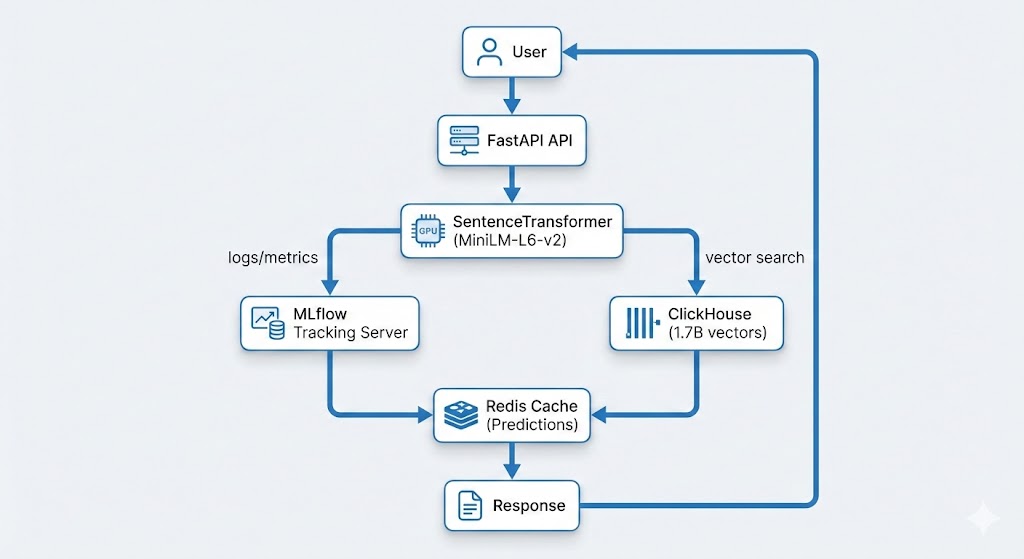
The Architecture (High-Level)

This post covers the initial problems, requirements, and overall direction.

Part 2 goes deep into MLflow, the registry, and Kubernetes deployment.

Part 3 focuses on monitoring, drift detection, canaries, and scaling.

I’ll also publish a dedicated GPU/Kubernetes deep-dive later – covering memory fragmentation, batching, device plugin configuration, GPU sharing, and more.

The Practical Issues I Wanted to Improve

These weren’t “critical failures”, just things that become annoying or risky at scale:

1. Knowing which model version is running

Without a registry, it was easy to lose track.

2. Manual deployment steps

Fine for experiments, less so for a live service.

3. Occasional GPU memory quirks

SentenceTransformers sometimes leaves memory allocated longer than ideal.

4. Limited monitoring

I wanted clearer insight into latency, drift, and GPU usage.

5. No safe model testing workflow

I needed a way to expose just a slice of traffic to new models.

What the Final System Achieved

  • 99.9% uptime
  • Zero-downtime model updates
  • ~50% latency improvement
  • Stable GPU utilisation
  • Full visibility into predictions
  • Drift detection and alerting
  • ClickHouse scale for billions of rows
  • Running cost around £5/month

That’s about it for Part 1

In Part 2, I’ll show the exact MLflow & the Kubernetes setup:

  • How experiments are logged
  • How the model registry is structured
  • How the API automatically loads the current Production model
  • Kubernetes deployment manifests
  • GPU-backed pods and health checks
  • How rolling updates actually work

Then Part 3 covers:

  • Monitoring every prediction
  • Drift detection
  • Canary deployments
  • Rolling updates
  • Automated model promotion

And the GPU deep-dive will follow as a separate post


Remora-ai


Introducing Remora: Building a Real-Time Market Risk Engine | Tech Deep Dive


Introducing Remora: Building a Real-Time Market Risk Engine

I’ve recently launched a new project: Remora. It’s a service for algorithmic traders that adds a layer of market awareness I felt was missing from tools like Freqtrade – helping strategies actually understand the current market and make smarter trading decisions.

When building and backtesting crypto strategies, I noticed that even the “good” ones would get wrecked by just a few bad trades during wild market swings. Remora is my attempt to fix that: it gives trading bots real-time context so they can avoid high-risk conditions and focus on opportunities that actually make sense.

TL;DR: I built Remora, a production-ready market risk microservice using FastAPI, ClickHouse, and modern MLOps practices. It analyzes dozens of real-time market conditions and returns a simple safe_to_trade signal that can filter out 30-60% of losing trades. The system is now live, handling real-time requests with sub-100ms response times, and includes a complete observability stack with Prometheus and Grafana.

The Problem: Trading Bots Need Market Context

The Challenge

When building algorithmic trading strategies, I noticed a consistent pattern:

  • Good strategies were failing not because of bad logic, but because they traded during terrible market conditions
  • 30-60% of losing trades happened during extreme fear, volatility spikes, choppy markets, or bearish news events
  • Strategies had no awareness of current market regime, volatility levels, or external risk factors
  • Single bad entries during panic conditions could wipe out weeks of gains

Traditional trading bots focus on technical indicators (RSI, MACD, moving averages) but completely ignore:

  • Market regime (bull, bear, choppy, panic)
  • Volatility levels (normal vs extreme)
  • External sentiment (Fear & Greed Index, news sentiment)
  • Macro indicators (VIX, DXY, funding rates)
  • Event flags (extreme fear, panic, bear market signals)
Problem: Trading bots were executing trades during conditions that any experienced trader would avoid. They needed a layer of market awareness to filter out high-risk entries.

What Is Remora?

Remora is a real-time market risk microservice that provides trading bots with market context. It analyzes dozens of market conditions in real-time and returns a simple boolean: safe_to_trade.

Core Features

  • Market Regime Detection: Classifies market conditions (bull, bear, choppy, high_vol, panic, sideways)
  • Volatility Scoring: Calculates and classifies volatility (low, normal, high, extreme) using ATR%, Bollinger width, and returns stddev
  • Composite Risk Score: Weighted risk assessment (0-1) from multiple factors
  • Safe-to-Trade Flag: Boolean signal indicating whether conditions are favorable
  • REST API: Real-time API endpoints for live trading integration
  • Multi-Exchange Support: Works with Kraken, Binance, and other CCXT-compatible exchanges
  • Observability Stack: Prometheus metrics and Grafana dashboards

What Remora Monitors

Remora continuously tracks:

  • Technical Indicators: SMA50/200, ADX, ATR%, RSI, Bollinger Bands
  • Market Regime: Trend classification, momentum, trend strength
  • External Data: Fear & Greed Index, CryptoPanic news sentiment, VIX, DXY
  • On-Chain Metrics: BTC dominance, funding rates, liquidation data
  • Event Flags: Extreme fear, panic, bear market, high volatility signals

Example API Response

Listing 1: Remora risk assessment API response

{
  "safe_to_trade": false,
  "risk_score": 0.77,
  "risk_class": "very_high",
  "regime": "choppy",
  "volatility": 0.047,
  "volatility_classification": "low",
  "risk_confidence": 0.73,
  "trend_classification": "sideways",
  "momentum_classification": "neutral",
  "reasoning": [
    "Extreme Fear (F&G=15) - blocking trades",
    "Trading disabled due to global risk conditions"
  ],
  "blocked_by": ["flag_extreme_fear"],
  "risk_breakdown": {
    "volatility": 0.017,
    "regime": 0.24,
    "trend_strength": 0.1,
    "momentum": 0.066,
    "external": 0.35
  },
  "event_flags": {
    "flag_extreme_fear": true,
    "flag_high_volatility": false,
    "flag_downtrend": false,
    "flag_panic": false
  },
  "recommendation": "no_entry",
  "fear_greed_index": 15,
  "btc_dominance": 56.37,
  "funding_rate": 0.000069,
  "vix": 20.52,
  "dxy": 122.24
}
Key Insight: Remora doesn’t just say yes or no. It returns complete transparency: risk scoring, regime classification, volatility levels, event flags, and human-readable reasoning – so you always know why a trade was blocked.

Tech Stack: FastAPI, ClickHouse, and Modern MLOps

Remora is built with a modern, production-ready tech stack designed for real-time performance and scalability:

Backend & API

  • FastAPI: Modern Python web framework with async support, automatic OpenAPI docs, and excellent performance
  • Python 3.11+: Type hints, async/await, modern language features
  • Pydantic: Data validation and settings management
  • CCXT: Unified cryptocurrency exchange API for multi-exchange support
  • APScheduler: Background task scheduling for data updates

Data Storage & Analytics

  • ClickHouse: Columnar database for time-series data, historical risk metrics, and analytics
  • Materialised Views: Pre-aggregated risk data for fast queries (learned from my ClickHouse MLOps work)
  • CSV Output: File-based output for backtesting compatibility with Freqtrade

Observability & Monitoring

  • Prometheus: Metrics collection and time-series storage
  • Grafana: Real-time dashboards for risk metrics, API performance, and system health
  • Custom Metrics: Risk scores, regime classifications, API latency, data freshness

Infrastructure

  • Docker & Docker Compose: Containerized deployment with observability stack included
  • Uvicorn: ASGI server for FastAPI
  • Environment Variables: Configuration management for different environments

External Data Sources

  • Exchange APIs: Kraken, Binance via CCXT
  • Alternative.me: Fear & Greed Index
  • CryptoPanic: News sentiment analysis
  • Yahoo Finance: VIX, DXY macro indicators
  • Coinglass: Funding rates, liquidation data

Why This Stack? FastAPI provides excellent async performance and automatic API documentation. ClickHouse handles billions of time-series records efficiently. Prometheus/Grafana give real-time visibility into system health. Docker makes deployment trivial. Together, they form a production-ready microservice architecture.

System Architecture

Remora follows a microservice architecture with clear separation of concerns. External data sources feed into background data fetchers, which populate the risk calculation engine. The FastAPI layer serves real-time risk assessments to trading bots via REST API endpoints.

Component Breakdown

Listing 2: Remora service structure

remora_service/
├── app/
│   ├── main.py              # FastAPI application
│   ├── config.py            # Configuration management
│   ├── models.py            # Pydantic models
│   ├── scheduler.py         # Background scheduler
│   ├── metrics.py           # Prometheus metrics
│   ├── engine/              # Risk calculation engine
│   │   ├── risk_calculator.py
│   │   ├── regime_detector.py
│   │   └── volatility_scorer.py
│   ├── data/                # Data fetching and processing
│   │   ├── fetchers/
│   │   └── processors/
│   └── api/                 # API routes
│       └── v1/
│           ├── risk.py
│           ├── regime.py
│           └── volatility.py
├── examples/                # Integration examples
├── tests/                   # Test suite
├── grafana/                 # Grafana dashboards
├── prometheus/              # Prometheus configuration
├── Dockerfile
├── docker-compose.yml
└── requirements.txt

Data Flow

  1. Background Scheduler: Runs every minute (configurable) to fetch fresh market data
  2. Data Fetchers: Collect OHLCV data, external indicators (Fear & Greed, VIX, DXY), and news sentiment
  3. Risk Engine: Calculates technical indicators, classifies regime, scores volatility, computes composite risk
  4. Storage: Results stored in ClickHouse for historical analysis and CSV files for backtesting
  5. API Layer: FastAPI serves real-time risk assessments with sub-100ms response times
  6. Observability: Prometheus collects metrics, Grafana visualizes system health

Implementation Deep Dive

Risk Score Calculation

At the heart of Remora is a composite risk score that quantifies the current market environment. This score combines multiple factors, including volatility, trend strength, momentum, and broader market regimes, into a single 0-1 scale. The higher the score, the riskier the market conditions, helping algorithmic traders avoid potentially catastrophic trades.

Market Regime Classification

Remora continuously evaluates the market and classifies it into regimes such as bull, bear, choppy, or panic. These regimes provide context for trading strategies, so bots can adapt their behaviour dynamically rather than trading blindly. The engine looks at how trends, volatility, and momentum interact to determine the current regime.

Safe-to-Trade Decisions

Using the risk score and regime classification, Remora flags whether market conditions are currently safe for trading. This allows trading bots to pause or reduce exposure during high-risk periods, and resume normal operation when conditions are more favourable. The system also considers external market events to further refine its decisions.

Integration via API

Traders can access Remora’s insights in real time through a simple API. For example, a bot can query the risk engine for a trading pair, receive the current risk assessment, and make informed decisions programmatically.

This design keeps your strategies aware of the market context – the kind of awareness that human traders rely on instinctively, but which most algorithmic bots lack.

Observability and Monitoring

If you don’t already know: I love observability. So this was a good excuse to set up a comprehensive (maybe a little over the top) observability stack for Remora to monitor system health, API performance, and data quality in real-time and in great detail.

Monitoring Infrastructure

The monitoring setup includes:

  • Prometheus: Collects metrics on risk scores, regime classifications, API request rates, latency percentiles, and data freshness from external sources
  • Grafana: Real-time dashboards visualising risk metrics across all tracked pairs, regime distributions, API performance trends, and system health indicators
  • Custom Metrics: Track risk scores per trading pair, volatility classifications, external API error rates, and data age from each source

This observability stack helps ensure the service is performing correctly, data sources are fresh, and API responses are fast. It’s been essential for debugging issues and optimising performance during development and production use.

Results and Impact

Performance Metrics

Metric Value
API Response Time 50-100ms (p95)
Data Update Frequency Every 1 minute (configurable)
Uptime 99.9%+ (with fail-open design)
Concurrent Requests 1000+ req/s (async FastAPI)
Historical Data 619,776 records (2020-2025, 5-min granularity)

Backtesting Results

Backtests across 51,941 trades show:

  • 30-60% of losing trades occur during high-risk conditions that Remora flags
  • Improved win rates when Remora filtering is applied
  • Reduced drawdowns by avoiding entries during extreme volatility
  • Better risk-adjusted returns (Sharpe ratio improvements)

Real-World Usage

Remora is now:

  • Live in production at remora-ai.com
  • Integrated with Freqtrade strategies via REST API
  • Used by traders for both automated and manual trading decisions
  • Open source with Python client library available
Impact: Remora transforms trading bots from blind executors into context-aware systems. By filtering out high-risk entries, strategies can focus on favorable market conditions, leading to better risk-adjusted returns and reduced drawdowns.

Lessons Learned

1. Fail-Open Design Is Critical

Lesson: Remora must never become a single point of failure. If the API is unavailable, strategies should continue trading (fail-open). This ensures Remora enhances strategies without breaking them.

Implementation: All integrations include timeout protection (2s default) and exception handling that defaults to allowing trades.

2. Transparency Builds Trust

Lesson: Traders need to understand why a trade was blocked. Remora returns complete reasoning, risk breakdowns, and event flags – not just a boolean.

Implementation: Every API response includes reasoning array, risk_breakdown by component, and event_flags showing which conditions triggered blocks.

3. Observability Is Not Optional

Lesson: Production systems need real-time visibility. Prometheus and Grafana provide essential insights into system health, API performance, and data freshness.

Implementation: Complete observability stack included in Docker Compose, with pre-configured dashboards for common metrics.

4. Async Architecture Scales

Lesson: FastAPI’s async support enables handling hundreds of concurrent requests with minimal resource usage. This is essential for a microservice that needs to respond quickly.

Implementation: All data fetching and API endpoints use async/await, enabling concurrent request handling.

5. ClickHouse for Time-Series Analytics

Lesson: ClickHouse is perfect for storing and analysing billions of time-series risk records. Materialised views enable fast historical analysis and backtesting.

Implementation: All risk assessments stored in ClickHouse with materialised views for common query patterns (learned from my previous ClickHouse work).

6. Start Simple, Iterate

Lesson: The first version of Remora was much simpler. I started with basic regime detection and volatility scoring, then added external data sources, event flags, and comprehensive reasoning over time.

Implementation: Remora v0.1 had 3 regime types. v0.2 added 6 regime types, external data, event flags, and full observability. Future versions will add ML-based predictions.

Conclusion

Remora transforms trading bots from blind executors into context-aware systems. By providing real-time market risk assessment with complete transparency, it enables strategies to avoid high-risk conditions and focus on favorable market regimes.

Key Technical Achievements:

  • FastAPI async architecture handling 1000+ req/s
  • ClickHouse for efficient time-series storage and analytics
  • Prometheus/Grafana for real-time observability
  • Docker containerization for easy deployment
  • Multi-Exchange support via CCXT

For Your Project:

Open Source Repositories

I’ve created two GitHub repositories to help others get started with Remora:


remora-freqtrade

Complete Freqtrade integration examples and onboarding guides. Includes working strategy templates, configuration examples, and step-by-step tutorials.


remora-backtests

Reproducible backtesting framework with complete methodology, historical data scripts, and visualisation tools. All backtest results are fully reproducible.

Additional Resources

Next Steps: Remora is live and ready to use. If you’re building trading strategies, consider adding market context awareness. Start with one integration, measure the impact, then expand. The fail-open design means you can add Remora without risk – it only enhances, never breaks.

Have you built similar market awareness systems? I’d love to hear about your experiences and any lessons learned. Feel free to reach out or share your story in the comments below.


MLOps for DevOps Engineers – MiniLM & MLflow demo

MLOps for DevOps Engineers – MiniLM & MLflow pipeline demo


As a DevOps and SRE engineer, I’ve spent a lot of time building automated, reliable pipelines and cloud platforms. Over the last couple of years, I’ve been applying the same principles to machine learning (ML) and AI projects.


One of those projects is CarHunch, a vehicle insights platform I developed. CarHunch ingests and analyses MOT data at scale, using both traditional pipelines and applied AI. Building it taught me first-hand how DevOps practices map directly onto MLOps: versioning datasets and models, tracking experiments, and automating deployment workflows. It’a a new and exciting area but the core idea is very much the same, with some interesting new tools and concepts added.


To make those ideas more approachable for other DevOps engineers, I have put together a minimal, reproducible demo using MiniLM and MLflow.


You can find the full source code here:

github.com/DonaldSimpson/mlops_minilm_demo


The quick way: make run

The simplest way to try this demo is with the included Makefile; that way all you need is Docker installed

# clone the repo
git clone https://github.com/DonaldSimpson/mlops_minilm_demo.git

cd mlops_minilm_demo

# build and run everything (training + MLflow UI)
make run


That one ‘make run’ command will:

  • – Spin up a containerised environment
  • – Run the demo training script (using MiniLM embeddings + Logistic Regression)
  • – Start the MLflow tracking server and UI


Here’s a quick screngrab of it running in the console:

Once it’s up & running, open
http://localhost:5001
in your browser to explore logged experiments


What the demo shows

– MiniLM embeddings turn short MOT-style notes (e.g. “brakes worn”) into vectors

– A Logistic Regression classifier predicts pass/fail

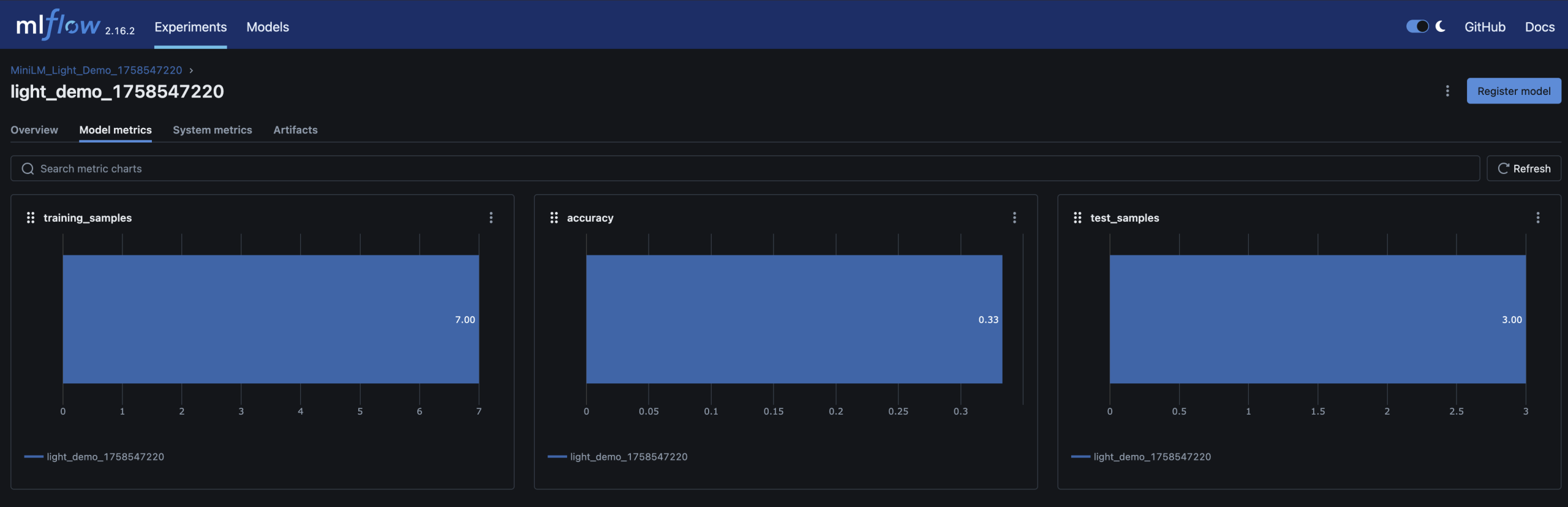
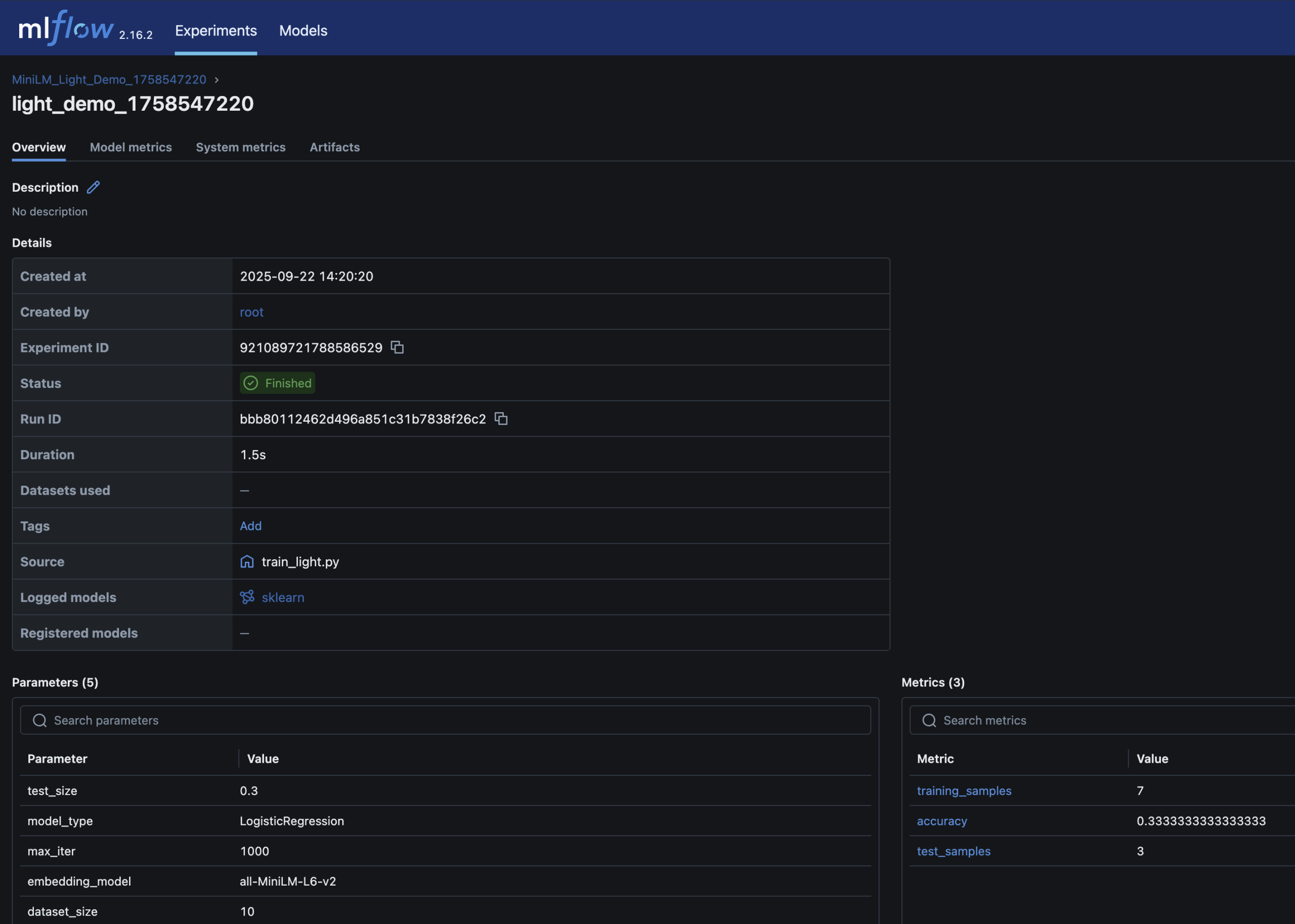
– Parameters, metrics (accuracy), and the trained model are logged in MLflow

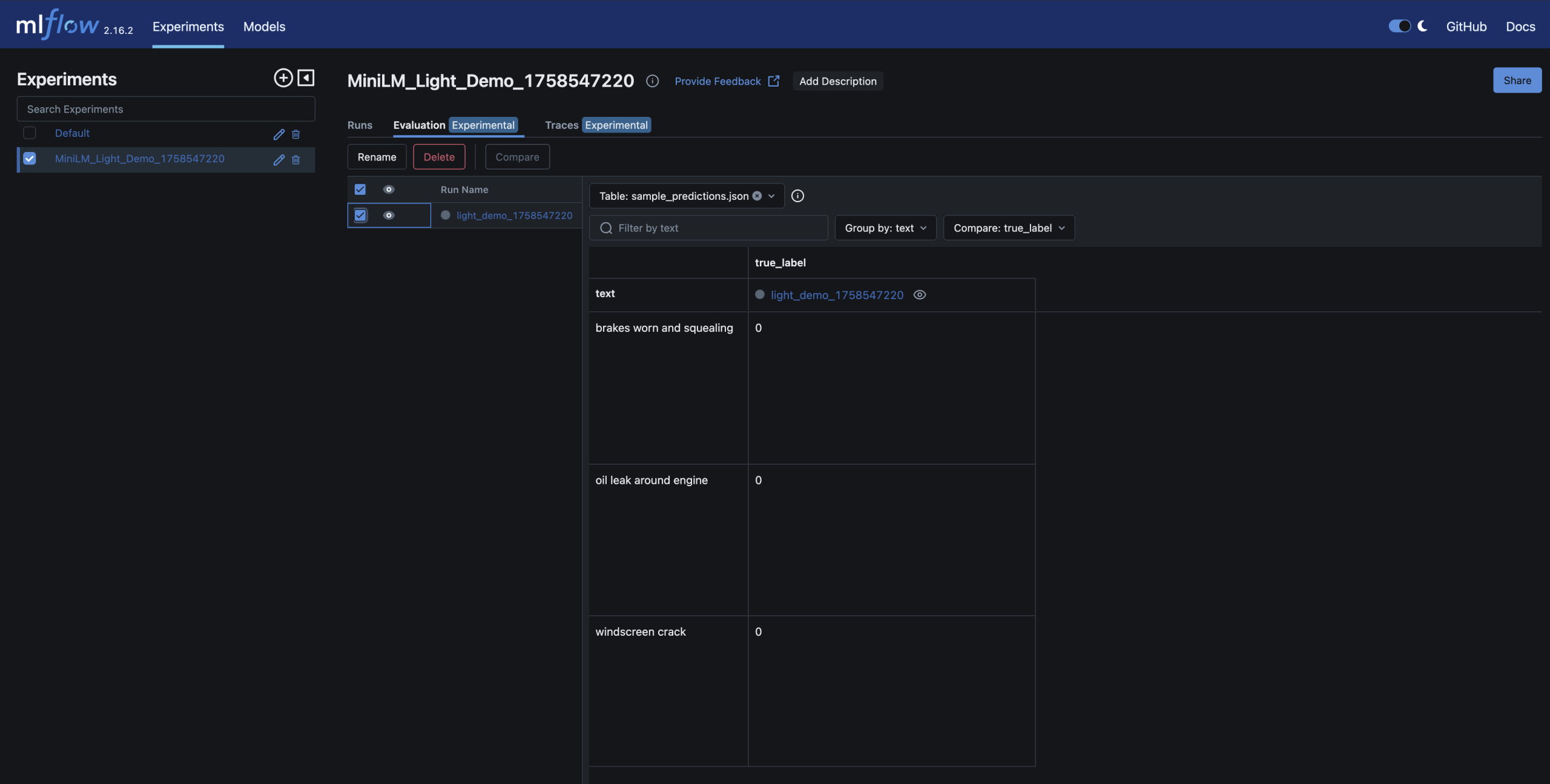
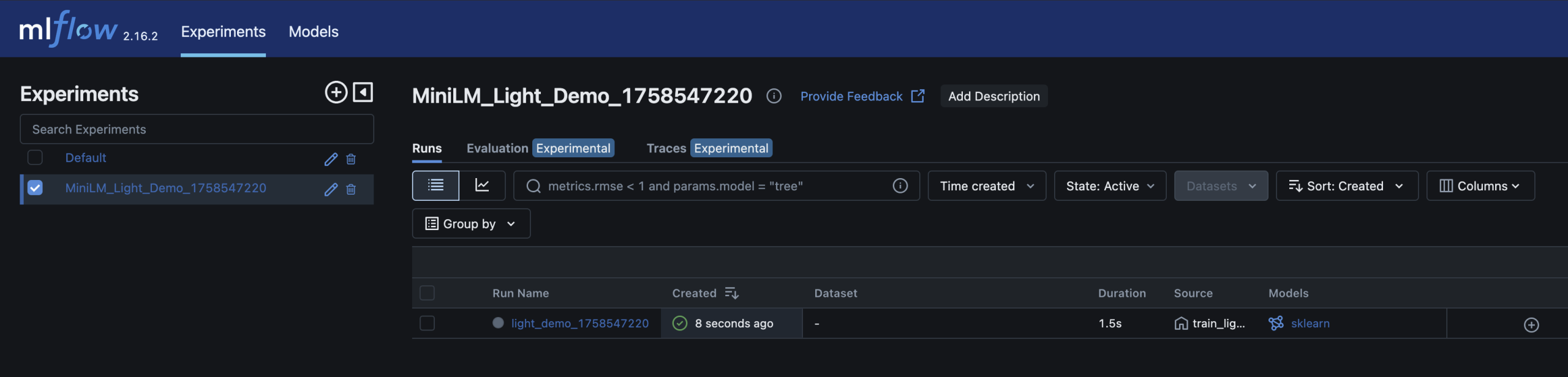
– You can inspect and compare runs in the MLflow UI – just like you’d review builds and artifacts in CI/CD

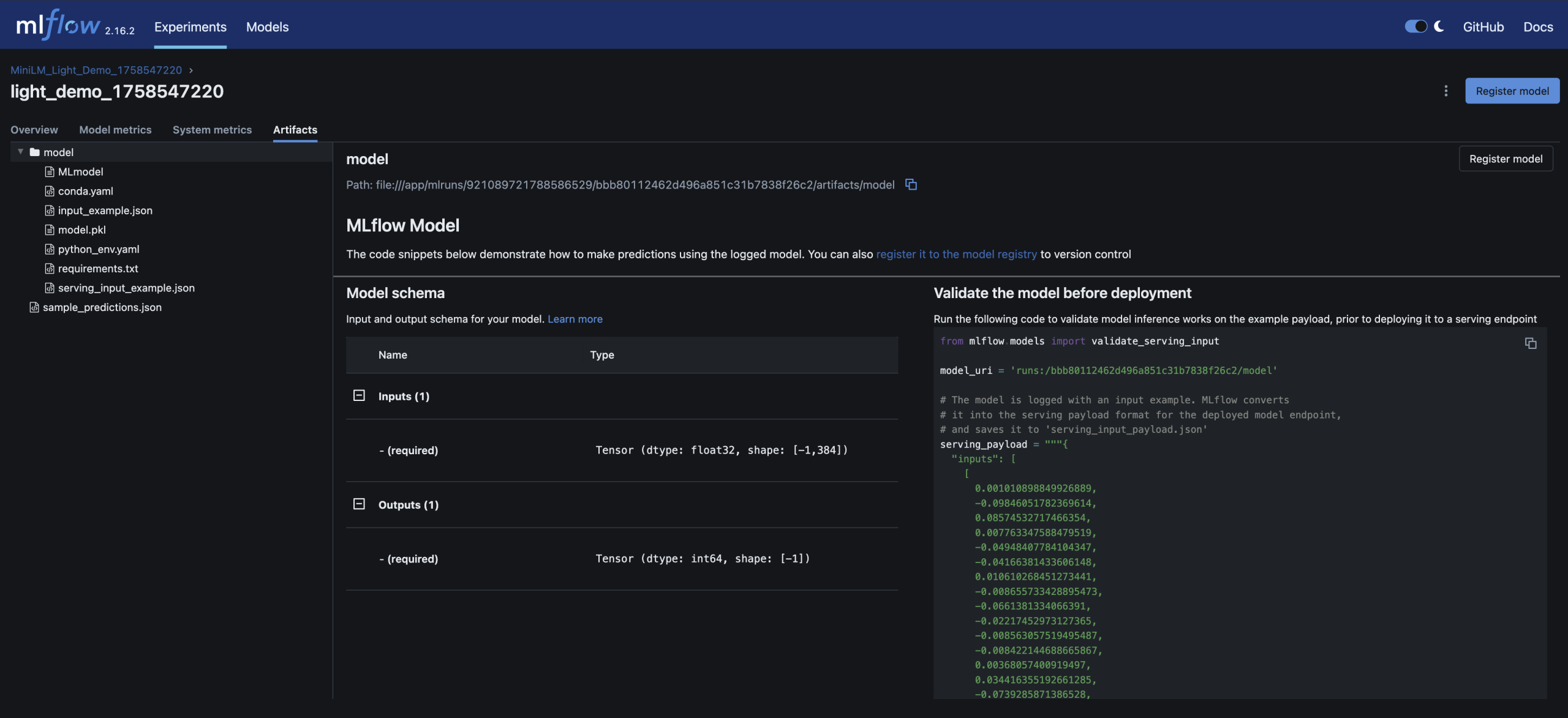
– Run detail; accuracy metrics and model artifact stored alongside parameters


Here are screenshots of the relevant areas from the MLFlow UI:


Why this matters for DevOps engineers

    • Familiar workflows: MLflow feels like Jenkins/GitHub Actions for models – every run is logged, reproducible, and auditable


    • Quality gates: just as builds pass/fail CI, models can be gated by accuracy thresholds before promotion


    • Reproducibility: datasets, parameters and artifacts are versioned and tied to each run


    • Scalability: the same demo pattern can scale to real workloads – this is a scaled down version of my local process


Other ways to run it


If you prefer, the repo includes alternatives:


    • Python venv: create a virtualenv, install requirements.txt, run train_light.py


    • Docker Compose: build and run services with docker-compose up --build


    • Make targets: make train_light (quick run) or make train (full run)


These are useful if you want to dig a little deeper and see exactly what’s happening


Next steps

Once you’re comfortable with this small demo, natural extensions are:


    • – Swap in a real dataset (e.g. DVLA MOT data)


    • – Add data validation gates (e.g. Great Expectations)


    • – Introduce bias/fairness checks with tools like Fairlearn


    • – Run the pipeline in Kubernetes (KinD/Argo) for reproducibility


    • – Hook it into GitHub Actions for end-to-end CI/CD


Closing thoughts

DevOps and MLOps share the same DNA: versioning, automation, observability, reproducibility. This demo repo is a small but practical bridge between the two


Working on CarHunch gave me the chance to apply these ideas in a real platform. This demo distills those lessons into something any DevOps engineer can try locally.


Try it out at github.com/DonaldSimpson/mlops_minilm_demo and let me know how you get on


CarHunch – Vehicle Insights Platform

CarHunch Logo

Turning billions of MOT and accident records into real-time vehicle insights.

Visit the live project here:

www.carhunch.com


What CarHunch Does

  • Aggregates billions of MOT test results and STATS19 UK accident records.
  • Provides real-time analytics on vehicle makes, models, years, and conditions.
  • Compares a specific car against similar vehicles (make/model/year).
  • Highlights common MOT failures and safety risks for different vehicles.

How It Works

CarHunch is powered by a ClickHouse data warehouse for ultra-fast queries, with:

  • Python ETL pipelines for MOT and accident data ingestion.
  • Incremental updates from DVLA bulk & delta files.
  • Redis caching for instant lookups.
  • Machine learning (MiniLM embeddings + clustering) to spot defect patterns.
  • LLM integration (LLaMA) to generate natural-language insights.

Example Insights

“Your 2010 Ford Focus has a 28% higher MOT failure rate than average for similar cars, mainly due to suspension wear.”

“BMW 3 Series (2008–2012) commonly fail MOTs due to brake issues around 80,000 miles.”

“Motorcycles show a different pattern of MOT failures compared to cars, with lighting and tyre defects being most common.”

Technical Overview

CarHunch isn’t just about insights — it’s also a demonstration of building a modern, high-performance OLAP data platform from the ground up.

  • Database: ClickHouse OLAP warehouse for real-time analytics on billions of records.
  • ETL: Python pipelines ingesting DVLA MOT bulk/delta files and STATS19 accident datasets.
  • Data Modeling: Normalised vehicle/test/defect schema with indexing and partitioning for query performance.
  • APIs: REST endpoints (Flask/FastAPI) serving real-time queries to front-end applications.
  • Caching: Redis for ultra-fast repeated lookups.
  • Machine Learning: MiniLM embeddings + HDBSCAN clustering for identifying defect patterns and grouping similar vehicles.
  • LLM Integration: Local LLaMA models for natural-language explanations and summaries.
  • Deployment: Dockerised services on a Proxmox node, easily portable to cloud infrastructure.
  • Monitoring: Logging & system metrics (rsyslog, lm-sensors) for reliability and performance tracking.

Why CarHunch?

CarHunch shows how big data + AI can turn raw government datasets into meaningful insights that benefit both consumers and the automotive industry.

👉 Explore more at

CarHunch.com

CarHunch Screenshot

 
Get in touch
if you’d like to collaborate or learn more.

Monitoring Proxmox with Grafana and InfluxDB

I took these notes while setting up Grafana and InfluxDB on Proxmox.

I hit a few minor issues so thought I’d post it here as a mini “How To” or reference for others.


NOTE: If you are just looking for a simple and light-weight way to monitor Proxmox stats (including memory, CPU, disk for your LXCs and VMs), check out the brief section on “Pulse” at the end of this page!


This setup allows me to easily monitor my Proxmox host and the VMs and LXCs it runs via a nice Grafana dashboard, with the data/metrics stored in InfluxDB.


The main steps are:


1. Install Influx DB
2. Install Grafana
3. Configure Proxmox
4. Configure InfluxDB
5. Configure Grafana

Install InfluxDB

Proxmox makes this very quick and very easy, if you’re happy to trust the Community scripts available here:

https://community-scripts.github.io/ProxmoxVE/

which just means running this one-liner in the proxmox console:


bash -c "$(curl -fsSL https://raw.githubusercontent.com/community-scripts/ProxmoxVE/main/ct/influxdb.sh)"


this created an InfluxDB LXC in a couple of minutes.


For me, the IP and port were: http://192.168.0.24:8086


Install Grafana

This was much the same with a different script, and just meant running:


bash -c "$(curl -fsSL https://raw.githubusercontent.com/community-scripts/ProxmoxVE/main/ct/grafana.sh)"


then I also had a new Grafana instance here:


http://192.168.0.114:3000


Note that the default user:password for Grafana is admin:admin


Configure Proxmox

Next you need to set the Metrics Server used byProxmox, this will tell proxmox to send all metrics on itself and the VMs and LXCs it runs to InfluxDB.

This is set under “Datacenter” in the proxmox UI:


This looked straightforward too, but there were conflicting opinions on how to do it. I initially went with UDP which didn’t work for me; there was nowhere to set any authentication and I wasn’t allowing anonymous access to InfluxDB, so I switched to using HTTP which then allowed me to specify the (InfluxDB) credentials.


Configure InfluxDB

I created a “proxmox” organisation and a “proxmox” bucket in InfluxDB


I then created an API key/Token specifically for that proxmox bucket, which I used in the above pic.


To verify things were working between Proxmox and InfluxDB, I took a look in the data explorer:


You can see in that pic that InfluxDB has data on my VMs and LXCs, which it must have received from Proxmox, so I then knew my remaining issues were with the connection between InfluxDB <-> Grafana.


Configure Grafana


Initially I was getting “InfluxDB returned error: Unauthorized error reading influxDB” – hence the check above to confirm that Proxmox -> InfluxDB was working ok.


I couldn’t see anywhere in this version of Grafana to specify the Token for InfluxDB though – other screenshots on the ‘net had & used that option, but it wasn’t available for me 🙁


After some reading I learned you could set the Token by creating a new Custom HTTP Header called “Authorization” with the value “Token BXx…….7yBkw==” (that’s the word Token, a space, then the full Token you got from InfluxDB, all set as the Value for a new Custom HTTP Header called Authorization…)


This seemed surprisingly flaky to me, but it worked.


My (working) connection details look like this:


Prior to adding that HTTP Header, I was getting a successful connection but “0 measurements found”.


Next I added a new Proxmox dashboard to Grafana from here:
https://grafana.com/grafana/dashboards/10048-proxmox/


you don’t need to sign up there or anything else, just enter the ID: 10048 like in this pic and it’ll pull the Dashboard down:


Now I was finally able to see data being populated in Grafana from my Proxmox node & its VMs & LXCs:
Happy days.


The Pulse option


A possible alternative to the above Grafana and InfluxDB stack is to use “Pulse” – this was new to me and I have recently set it up too (you can never have enough monitoring!).


This is a very lightweight and more focused option that is really quick and easy to set up.


While the InfluxDB and Grafana approach can be extended to cover a vast range of monitoring and alerting for all sorts of things – I have set up and used it in several large companies I’ve worked for – if all you really want is Proxmox monitoring without those possibilities, this looks perfect.


with a simple install script for Proxmox:


bash -c "$(wget -qLO - https://github.com/community-scripts/ProxmoxVE/raw/main/ct/pulse.sh)"


Here’s my settings screen:


And here’s what it looks like on my Proxmox host:


Neat!


Seting up remote access to Frigate NVR with Nginx Proxy Manager LXC on Proxmox

This took me a little while to piece together, so I thought I’d write it up here in case it’s of use to anyone else, or if I ever need to go through it again….

Background

I use Frigate to to access and manage my home CCTV cameras. It is awesome, and I would like to be able to access it securely from outside my local network/LAN.

I also use HomeAssistant (“HA”) to process the feeds and notifications from Frigate, but would like to directly access the Frigate web UI. I’ll keep HA mostly out of this post.

Setup

A quick overview on my current setup:

Nginx Proxy Manager running on a Proxmox host as an LXC

Homeassistant also on Proxmox but as a VM (HAOS)

– Frigate and MQTT run as Docker containers on Ubuntu, on an old HP Prodesk. I may eventually migrate these over to Proxmox too, but they are working happily on this device and there may be issue migrating them to a VM or LXC due to harware; I use a USB Coral TPU for processing, and while I know you can pass that through to an LXC or VM, I haven’t gotten around to it.

Installing Nginx Proxy Manager on Proxmox

Thanks to Proxmox and the amazing community scripts, this was very quick and easy. I used this script to deploy it as an LXC:

https://community-scripts.github.io/ProxmoxVE/scripts?id=nginxproxymanager

When that was completed I opened up a firewall rule on my router to allow traffic via HTTPS/443 to the new Nginx LXC’s address.

Configure Nginx Proxy Manager and Frigate

The next step – and the crux of this post – was to setup Nginx Proxy Manager to allow access through to Frigate and handle authentication:

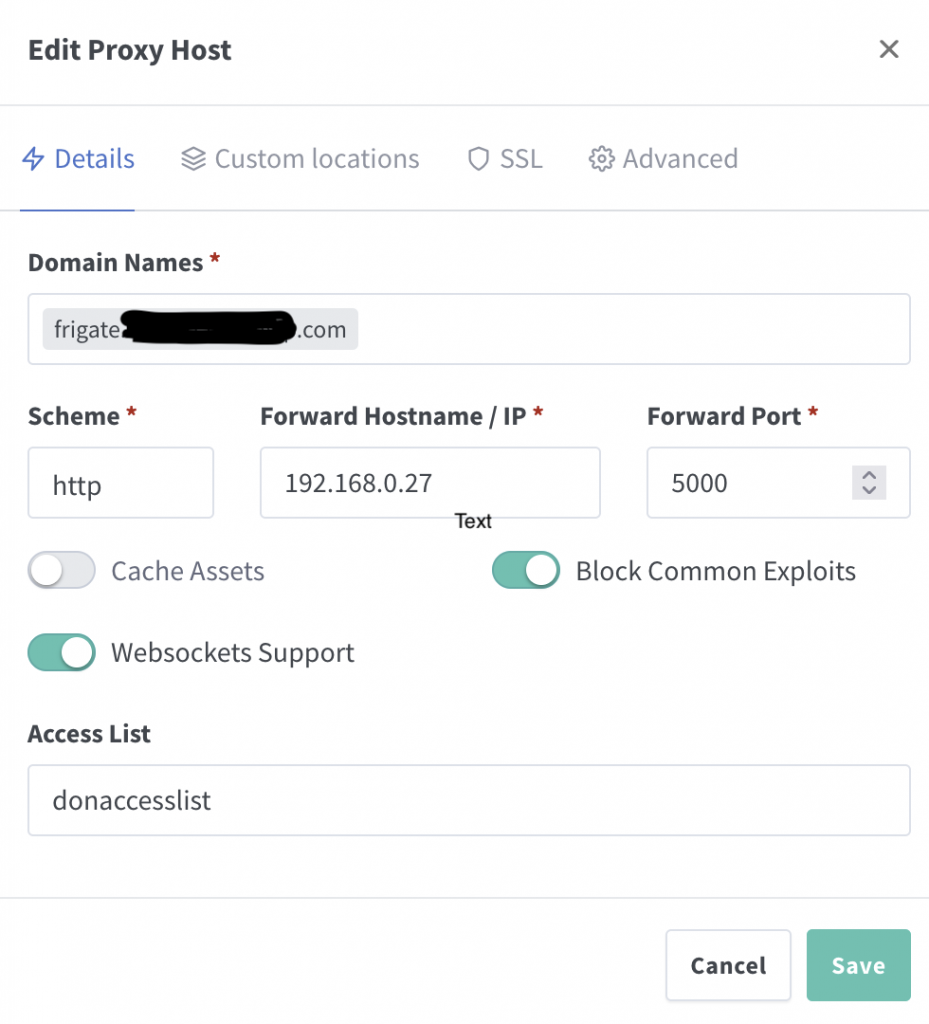
  • create a new Proxy Host

This is reasonably simple; specify a domain name that resolves to your host/router, then set the local IP your Frigate runs on and the port. I gather Websocket Suport is required, and you only need HTTPS here if your Frigate endpoint is using it. Nginx will serve this connection as HTTPS once setup to do so.

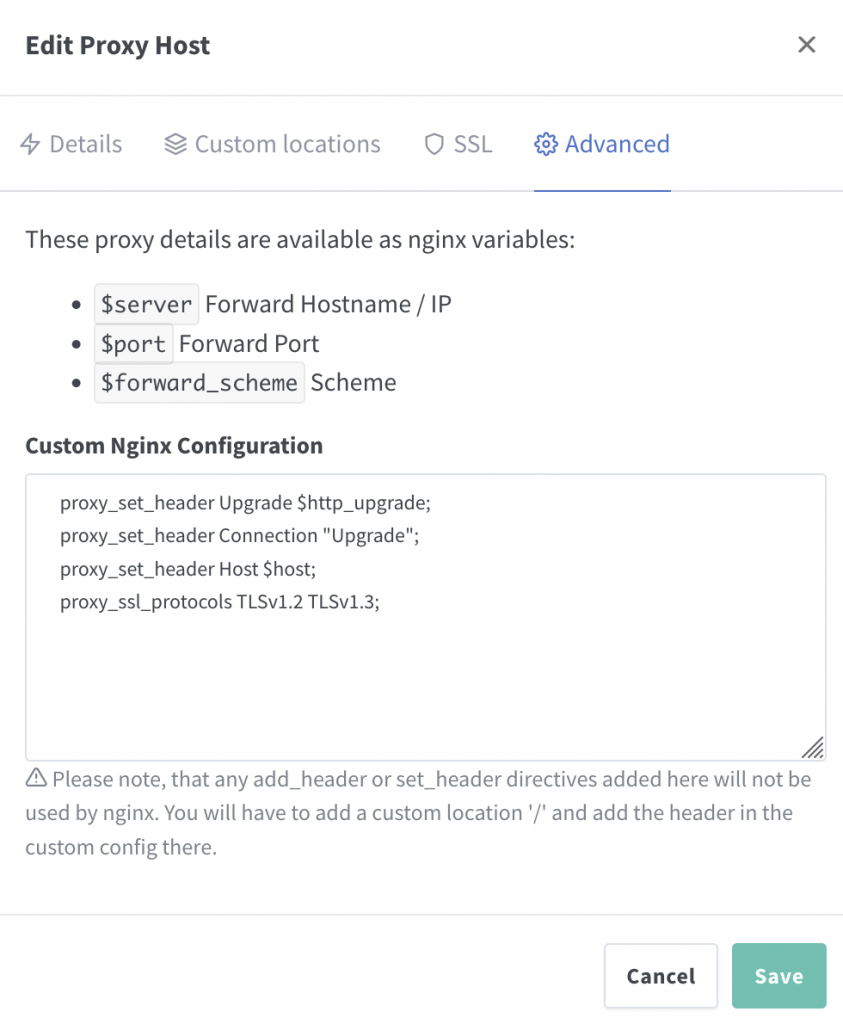
After some googling I found the following Nginx config was also recommended:

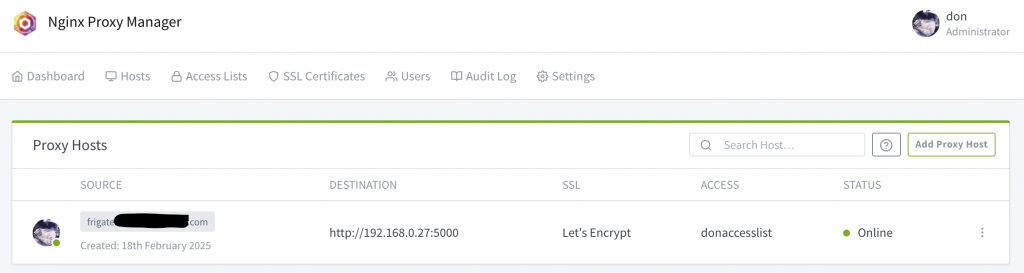
Once done, you should have an “Online” Proxy Host combining your domain name, your Frigate (destination) IP & listening port, with SSL option (I use Let’s Encrypt):

  • A simple Access List was defined prior to the above, just containing a user & password set under ‘Athorisation’. You will need to use these credentials to log in.
  • Frigate updates for TLS?
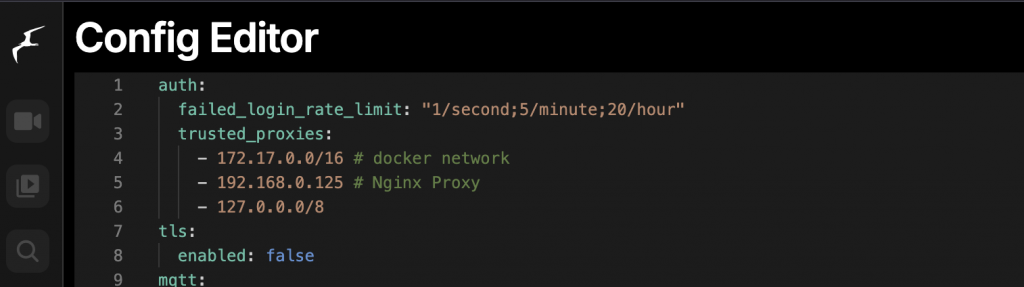
  • The trusted_proxies below were also recommended, but I didn’t need them in my case:


When I eventually got things working using port 8971 (instead of 5000) I was prompted for a login by Frigate, but I hadn’t set up auth in Frigate, just Nginx.

Nginx has the option to pass auth through to the destination, which may be nice, but for now I just disabled the feature in Frigate and after a restart things worked as expected, with the basic Nginx auth only:

auth:
  enabled: False
tls:
  enabled: false

It may be better/safer/nicer to have the auth passed through, enabled and managed in Frigate, along with TLS, but I haven’t done so yet.

  • port issues – 5000 or 8971?

When I was testing this I started off using port 8971 which is recommended here:
https://docs.frigate.video/configuration/authentication

This didn’t work for me; I then discovered I couldn’t connect to that port at all (even locally) so I went with 5000 initially as I knew that did work locally at least.

Eventually I realised that I’d never needed or opened up that port to my Frigate container! I updated my config to map port 8971 to 8971:

-p 8971:8971 

after that little oversight was corrected, it worked correctly!

When testing via a Browser (behind a VPN to emulate external access) I was prompted once for a login and then everything just worked; perfect!

I then went to check via my mobile phone, and that kept asking me to log in, with the message “Authorization required”


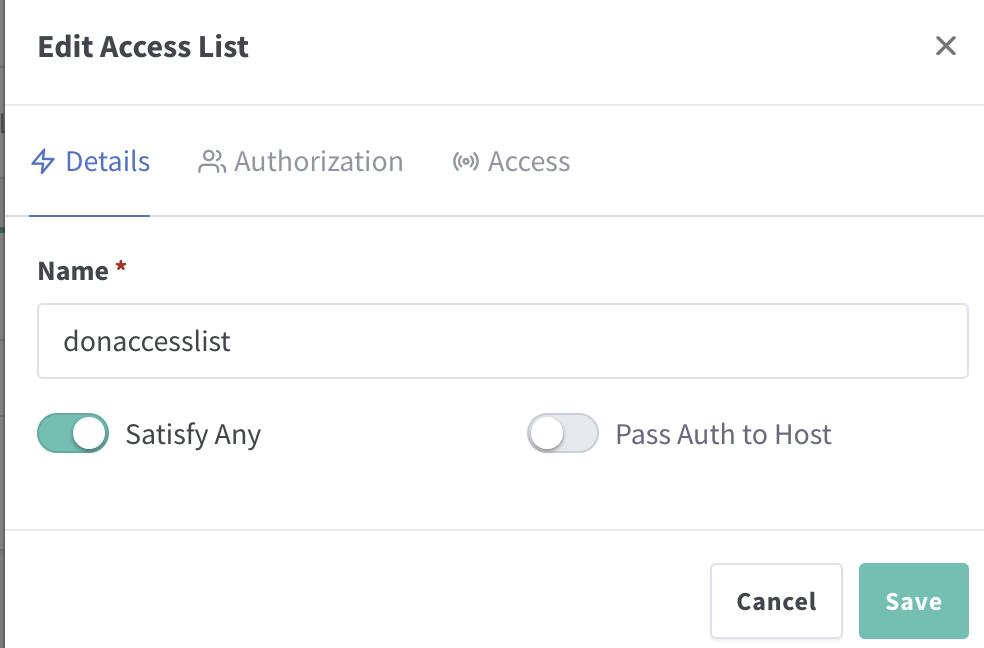
This was fixed by updating the Nginx Access List and setting “Satisfy Any” to be On/checked. That small change seems to have sorted the issue and everything now works perfectly on my phone too.

Integrating Solana with GitHub Workflows for Enhanced CI/CD

Intro

Being a fan of Solana and interested in exploring and using the technology, I wanted to find some practical use for it in my role as a DevOps Engineer.

This post attempts to do that, by integrating Solana in to a CI/CD workflow to provide an audit of build artefacts. Yes, there are many other ways & tools you could do this, but I found this particular combination interesting.

Overview

Solana is a high-performance blockchain platform known for its speed and scalability.

Integrating Solana with GitHub Workflows can bring a new level of security, transparency, and efficiency to your CI/CD pipelines.

This blog post demonstrates how to leverage Solana in a GitHub Workflow to enhance your development and deployment processes.

What is Solana?

Solana is a decentralised blockchain platform designed for high throughput and low latency. It supports smart contracts and decentralized applications (dApps) with a focus on scalability and performance. Solana’s unique consensus mechanism, Proof of History (PoH), allows it to process thousands of transactions per second.

Why Integrate Solana with GitHub Workflows?

Integrating Solana with GitHub Workflows can provide several benefits:

  • Immutable Build Artifacts: Store cryptographic hashes of build artifacts on the Solana blockchain to ensure their integrity and immutability.
  • Automated Smart Contract Deployment: Use Solana smart contracts to automate deployment processes.
  • Transparent Audit Trails: Record CI/CD pipeline activities on the blockchain for transparency and auditability.

Setting Up Solana in a GitHub Workflow

Let’s walk through an example of how to integrate Solana with a GitHub Workflow to store build artifact hashes on the Solana blockchain.

Step 1: Install Solana CLI

Ensure you have the Solana CLI installed on your local machine or CI environment:

sh -c "$(curl -sSfL https://release.solana.com/v1.8.0/install)"
Step 2: Set Up a Solana Wallet

Then, you need a Solana wallet to interact with the blockchain. You can use the Solana CLI to create a new wallet:

solana-keygen new --outfile ~/my-solana-wallet.json

This command generates a new wallet and saves the keypair to ~/my-solana-wallet.json.

Step 3: Create a GitHub Workflow

Create a new GitHub Workflow file in your repository at .github/workflows/solana.yml:

name: Solana Integration

on:
  push:
    branches:
      - main

jobs:
  build:
    runs-on: ubuntu-latest

    steps:
      - name: Checkout code
        uses: actions/checkout@v2

      - name: Set up Solana CLI
        run: |
          sh -c "$(curl -sSfL https://release.solana.com/v1.8.0/install)"
          export PATH="/home/runner/.local/share/solana/install/active_release/bin:$PATH"
          solana --version

      - name: Build project
        run: |
          # Replace with your build commands
          echo "Building project..."
          echo "Build complete" > build-artifact.txt

      - name: Generate SHA-256 hash
        run: |
          sha256sum build-artifact.txt > build-artifact.txt.sha256
          cat build-artifact.txt.sha256

      - name: Store hash on Solana blockchain
        env:
          SOLANA_WALLET: ${{ secrets.SOLANA_WALLET }}
        run: |
          echo $SOLANA_WALLET > ~/my-solana-wallet.json
          solana config set --keypair ~/my-solana-wallet.json
          solana airdrop 1
          HASH=$(cat build-artifact.txt.sha256 | awk '{print $1}')
          solana transfer <RECIPIENT_ADDRESS> 0.001 --allow-unfunded-recipient --memo "$HASH"
Step 4: Configure GitHub Secrets

To securely store your Solana wallet keypair, add it as a secret in your GitHub repository:

  1. Go to your repository on GitHub.
  2. Click on Settings.
  3. Click on Secrets in the left sidebar.
  4. Click on New repository secret.
  5. Add a secret with the name SOLANA_WALLET and the content of your ~/my-solana-wallet.json file.
Step 5: Run the Workflow

Push your changes to the main branch to trigger the workflow. The workflow will:

  1. Check out the code.
  2. Set up the Solana CLI.
  3. Build the project.
  4. Generate a SHA-256 hash of the build artifact.
  5. Store the hash on the Solana blockchain.

Example Output and Actions

After the workflow runs, you can verify the transaction on the Solana blockchain using a block explorer like Solscan. The memo field of the transaction will contain the SHA-256 hash of the build artifact, ensuring its integrity and immutability.

Example Output:
Run sha256sum build-artifact.txt > build-artifact.txt.sha256
b1946ac92492d2347c6235b4d2611184a1e3d9e6 build-artifact.txt
Run solana transfer <RECIPIENT_ADDRESS> 0.001 --allow-unfunded-recipient --memo "b1946ac92492d2347c6235b4d2611184a1e3d9e6"
Signature: 5G9f8k9... (shortened for brevity)
Possible Actions:
  • Verify Artifact Integrity: Use the stored hash to verify the integrity of the build artifact before deployment.
  • Audit Trail: Maintain a transparent and immutable audit trail of all build artifacts.
  • Automate Deployments: Extend the workflow to trigger automated deployments based on the stored hashes.

Conclusion

Integrating Solana with GitHub Workflows provides a powerful way to enhance the security, transparency, and efficiency of your CI/CD pipelines.

By leveraging Solana’s blockchain technology, you can ensure the integrity and immutability of your build artifacts, automate deployment processes, and maintain transparent audit trails.

I have used solutions similar to this previously; by automatically adding a containers hash to an immutable database when it passes testing, while at the same time ensuring that the only images permissable for deployment in the next environment up (e.g. Production) exist on that list, you can (at least help to) ensure that only approved code is deployed.

If you’d like to learn more about Solana they have some great documentation and examples: https://solana.com/docs/intro/quick-start

Enhancing CI/CD Pipelines with Immutable Build Artifacts Using Crypto Technologies

Intro:

In the ever-evolving landscape of software development, ensuring the integrity and security of build artifacts is paramount. As CI/CD pipelines become more sophisticated, integrating cryptocurrency technologies can provide a robust solution for managing and securing build artifacts. This blog post delves into the concept of immutable build artifacts and how crypto technologies can enhance CI/CD pipelines.

Understanding CI/CD Pipelines

CI/CD pipelines are automated workflows that streamline the process of integrating, testing, and deploying code changes. They aim to:

  • Continuous Integration (CI): Automatically integrate code changes from multiple contributors into a shared repository, ensuring a stable and functional codebase.
  • Continuous Deployment (CD): Automatically deploy integrated code to production environments, delivering new features and fixes to users quickly and reliably.

The Importance of Immutable Build Artifacts

Build artifacts are the compiled binaries, libraries, and other files generated during the build process. Ensuring these artifacts are immutable—unchangeable once created—is crucial for several reasons:

  • Security: Prevents tampering and unauthorized modifications.
  • Reproducibility: Ensures that the same artifact can be deployed consistently across different environments.
  • Auditability: Provides a clear and verifiable history of artifacts.

Leveraging Crypto Technologies for Immutable Build Artifacts

Cryptocurrency technologies, particularly blockchain, offer unique advantages for managing build artifacts:

  • Decentralization: Distributes data across multiple nodes, reducing the risk of a single point of failure.
  • Immutability: Ensures that once data is written, it cannot be altered or deleted.
  • Transparency: Provides a transparent and auditable history of all transactions.

Implementing Immutable Build Artifacts in CI/CD Pipelines

  1. Generate Build Artifacts: During the CI process, generate the build artifacts as usual.
   # Example: Building a Docker image
   docker build -t my-app:latest .
  1. Create a Cryptographic Hash: Generate a cryptographic hash (e.g., SHA-256) of the build artifact to ensure its integrity.
   # Example: Generating a SHA-256 hash of a Docker image
   docker save my-app:latest | sha256sum
  1. Store the Hash on a Blockchain: Store the cryptographic hash on a blockchain to ensure immutability and transparency.
   # Example: Using a blockchain-based storage service
   blockchain-store --hash <generated-hash> --metadata "Build #123"
  1. Retrieve and Verify the Hash: When deploying the artifact, retrieve the hash from the blockchain and verify it against the artifact to ensure integrity.
   # Example: Verifying the hash
   retrieved_hash=$(blockchain-retrieve --metadata "Build #123")
   echo "<artifact-hash>  my-app.tar.gz" | sha256sum -c -

Example Workflow

  1. CI Pipeline:
  • Build the artifact (e.g., Docker image).
  • Generate a cryptographic hash of the artifact.
  • Store the hash on a blockchain.
  1. CD Pipeline:
  • Retrieve the hash from the blockchain.
  • Verify the artifact’s integrity using the retrieved hash.
  • Deploy the verified artifact to the production environment.

Benefits of Using Immutable Build Artifacts

  • Enhanced Security: Blockchain’s immutable nature ensures that build artifacts are secure and tamper-proof.
  • Improved Reproducibility: Immutable artifacts guarantee consistent deployments across different environments.
  • Increased Transparency: Blockchain provides a transparent and auditable history of all build artifacts.

Conclusion

Integrating cryptocurrency technologies with CI/CD pipelines to manage immutable build artifacts offers a range of benefits that enhance security, reproducibility, and transparency. By leveraging blockchain’s decentralized and immutable nature, organizations can ensure the integrity and authenticity of their build artifacts, providing a robust foundation for their CI/CD processes.

As the software development landscape continues to evolve, embracing these cutting-edge technologies will be crucial for maintaining a competitive edge and ensuring the reliability and security of software deployments. By implementing immutable build artifacts, organizations can build a more secure and efficient CI/CD pipeline, paving the way for future innovations.